Made for your next project
Free dartboard SVG & Svelte component
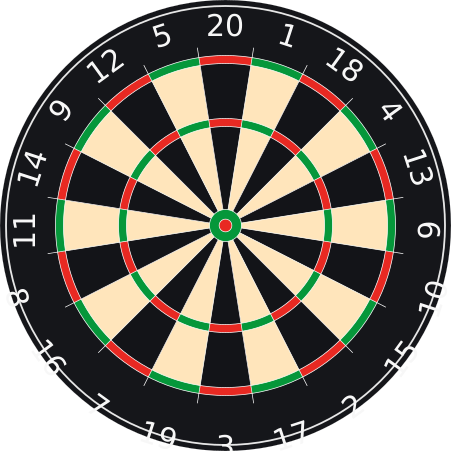
Add a numbered dartboard to your website, app or darts project. Download the original vector artwork used in Darts301 as a standalone SVG or a reusable Svelte component. Both are free for commercial, personal, educational and hobby use.
No signup or extra image files. Copyright and licence notices are included in each download.
One SVG, different sizes
The transparent background and square viewBox="0 0 451 451" make the vector artwork
easy to scale. These are the same SVG file at 96, 180 and 300 pixels. The largest example shrinks
to fit a narrow screen.
Display the SVG in HTML
Save dartboard.svg in your website’s public folder. In SvelteKit, use static/dartboard.svg. Set equal width and height values to choose a size:
<img src="/dartboard.svg" alt="Numbered dartboard" width="96" height="96" />
<img src="/dartboard.svg" alt="Numbered dartboard" width="180" height="180" />
<img src="/dartboard.svg" alt="Numbered dartboard" width="300" height="300" />
Make it responsive
Use width: 100%, a maximum width and height: auto to keep the board square
as its container changes. Change the maximum width to suit your layout.
<img
  src="/dartboard.svg"
  alt="Numbered dartboard"
  width="451"
  height="451"
  style="display: block; width: 100%; max-width: 451px; height: auto;"
/>
Use your own image path if you host it in a subfolder. Give informative boards a descriptive alt; use alt="" when the image is purely decorative. The number font
is embedded, so no external font request is needed.
Use Dartboard.svelte in SvelteKit
Save the Svelte 5 component as src/lib/components/Dartboard.svelte, then import
it into your page. It draws the board as inline SVG and needs no component library. This
example gives it an accessible label and a responsive, square container:
<script>
  import Dartboard from '$lib/components/Dartboard.svelte';
</script>

<div role="img" aria-label="Numbered dartboard" style="width: 100%; max-width: 300px; aspect-ratio: 1;">
  <Dartboard width="100%" height="100%" />
</div>
In a Svelte app without SvelteKit, import the file using its relative path. For a fixed size,
pass matching width and height strings, such as "240".
Choose your colours
Try the six colour pickers below the board. Changes appear live in the preview and the fills example. Download either format with your chosen colours, or reset to the original
palette. Both downloads include the licence notices.
<Dartboard
  width="240"
  height="240"
  fills={['#131418', '#FFE5BB', '#E82922', '#05973A', '#f7f7f7', '#15161A']}
/>
This is a display asset. Add your own input handling and scoring for an interactive game. Keep coordinates in the original 451 × 451 viewBox if you add dart positions or scoring overlays.
Licence: commercial and hobby use
The dartboard artwork and Svelte component by abitofcode.com are released under the MIT License. You may use, copy, modify and redistribute them, including in paid apps, client work and commercial websites. You do not need to publish your own application’s source code.
Keep the included copyright and permission notices with copies or substantial portions of the assets. An on-screen credit or backlink is appreciated, but is not required. The assets are provided “as is”, without warranty.
The embedded number font is adapted from SUSE and remains under the SIL Open Font License 1.1. Its copyright and licence are included alongside the MIT notice in each file; retain both when redistributing. The font’s separate licence permits embedding in commercial projects.